
Text Filterer3.4 - Download
You'll be able to download in few seconds.
Publisher Description
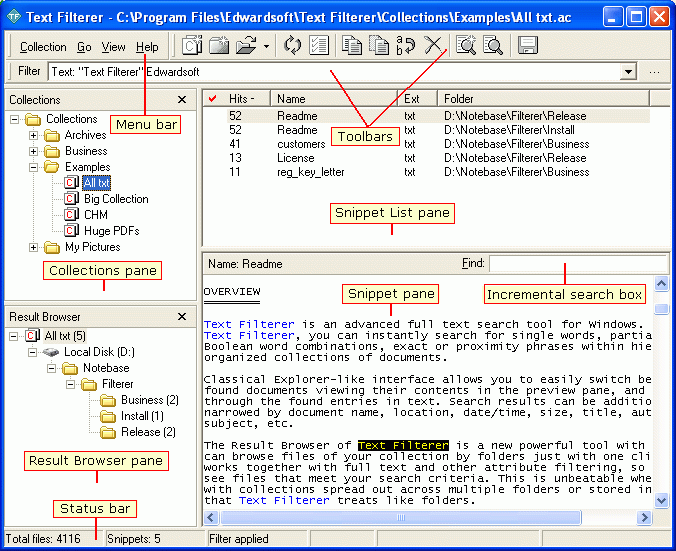
Text Filterer is an advanced desktop full text searcher. With TF, you can instantly search for single words, partial words, Boolean word combinations, and exact or proximity phrases within hierarchically organized collections of documents. Classic Explorer-like interface allows you to easily browse a search result by folders, switch between found documents viewing their contents in the preview pane, and navigate through the found words highlighted in text. Search results can also be filtered by file name, type, location, date/time, size, title, author, etc. Search queries are stored as filters being usable across sessions. TF supports plain text, Unicode, RTF, XLS, HTML, PDF, and uses MS Word and PowerPoint to index DOC, WPD, PPS, PPT and other MS Word supported files. TF supports many image formats such as BMP, ICO, GIF, TIFF, PNG, JPEG, PSD, WMF and more. TF searches for Exif data embedded into JPEG and TIFF files. TF transparently works with ZIP, RAR, MHT and CHM archives treating them like folders. With group of Excel files having same columns, TF can selectively search by columns and rows presenting search results in one view. TF shows search results in the list view, with documents (or their parts called snippets) as rows, and their attributes as columns. Column data of a search result can be saved to a tab-delimited text file for later processing with a spreadsheet or database application. Resultant documents can be copied/extracted to a folder with or without conversion of them into plain-text copies. TF has support for multilingual texts. Advanced features include selective searches by used-defined data fields established around a common regular structure of documents, if any, and chopping documents into snippets to make them units of your searches instead of entire files, if they can be structurally subdivided into such snippets.
About Text Filterer
This File & Disk Management program is available in English. It was last updated on 29 September, 2026. Text Filterer is compatible with the following operating systems: Other, Windows.
The company that develops Text Filterer is Edwardsoft. The latest version released by its developer is 3.4.
The download we have available for Text Filterer has a file size of 1.0 MB. Just click the green Download button above to start the downloading process. The program is listed on our website since 2009-10-27 and was downloaded 0 times. We have already checked if the download link is safe, however for your own protection we recommend that you scan the downloaded software with your antivirus. Your antivirus may detect the Text Filterer as malware if the download link is broken.
How to install Text Filterer on your Windows device:
- Click on the Download button on our website. This will start the download from the website of the developer.
- Once the Text Filterer is downloaded click on it to start the setup process (assuming you are on a desktop computer).
- When the installation is finished you should be able to see and run the program.
Program Details
System requirements
Download information
Pricing
Version History
version 3.4
posted on 2009-10-27
What\'s new in TF 3.4: The GUI look has been improved to be XP and Vista compatible.
Disclaimer
External Download
We do not host Text Filterer on our servers. We did not scan it for viruses, adware, spyware or other type of malware. This app is hosted by the software publisher and passed their terms and conditions to be listed there. We recommend caution when installing it.
The external download link for Text Filterer is provided to you by apps112.com without any warranties, representations or guarantees of any kind, so access it at your own risk.
If you have questions regarding this particular app contact the publisher directly. For questions about the functionalities of apps112.com contact us.
